
useSound
A specialized hook for zero-configuration, audible UI feedback using performance-optimized Base64 audio caching.Copy Markdown
Overview
useSound is a performance-first hook designed to provide immediate auditory feedback for UI interactions like button clicks and theme toggles. Unlike standard audio implementations that fetch files over the network, useSound uses Base64 embedded data and a global singleton cache to ensure near-zero latency playback.
Key Features:
- Zero Configuration: No need to host
.mp3files in your public folder; sounds are embedded directly in the code. - Global Cache: Reuses
Audioobjects across your entire application to minimize memory usage and initialization overhead. - Persistent Mute: Automatically respects and syncs a global mute state via
localStorage. - SSR Safe: Safely handles server-side rendering environments.
Installation
Automatic (CLI)
npx shadcn@latest add @nurav-ui/use-soundAlternatively, install via direct URL:
npx shadcn@latest add https://nurav-ui.vercel.app/r/use-sound.jsonManual Setup
Create the audio data file
Create hooks/sounds-data.ts and paste your Base64 encoded audio strings:
export const ON_SOUND = 'SUQzBAAA...'; // Full Base64 string here
export const OFF_SOUND = 'SUQzBAAA...'; // Full Base64 string here
export const CLICK_SOUND = 'SUQzBAAA...'; // Full Base64 string here
Create the hook file
Copy the source into hooks/use-sound.ts:
Usage
Basic Button Click
Providing audible feedback for a standard button interaction.
import { useSound } from '@/hooks/use-sound';

export default function ClickDemo() {
  const { mouseClick } = useSound();

  return (
    <button onClick={mouseClick} className="p-4 bg-primary text-white rounded">
      Click Me
    </button>
  );
}
Integrated Global Mute
Using the hook to manage a global sound settings toggle.
import { useSound } from '@/hooks/use-sound';
import { Volume2, VolumeX } from 'lucide-react';

export default function SoundToggle() {
  const { isMuted, toggleMute } = useSound();

  return (
    <button onClick={toggleMute} className="flex gap-2 items-center">
      {isMuted ? <VolumeX /> : <Volume2 />}
      <span>{isMuted ? 'Unmute Sounds' : 'Mute Sounds'}</span>
    </button>
  );
}
Controlled by SoundToggle
The recommended way to provide users with control over these sounds is by using the SoundToggle component. This component automatically stays in sync with all elements using the useSound hook.
Fully Customizable: Since the component is downloaded as raw source code into your project, you can easily edit its styling, animations, or even add custom sound logic to fit your specific design language.
Installation
npx shadcn@latest add @nurav-ui/sound-toggleUsage
To ensure the toggle is accessible globally, place it at the highest level of your component tree.
Place it in your root layout so it persists across all routes:
import { SoundToggle } from "@/components/nurav-ui/SoundToggle";

export default function Layout({ children }) {
  return (
    <html>
      <body>
        {children}
        <SoundToggle />
      </body>
    </html>
  );
}
Efficiency & Architecture
How it works
- Embedding: Audio files are converted to Base64 strings. This embeds the assets directly into your Javascript bundle, making the hook completely self-contained and eliminating network requests during playback.
- Standard Audio Objects: The hook uses the browser's native
AudioAPI, which is broadly supported and handles hardware acceleration for audio decoding. - Singleton Caching: A global
audioCacheobject sits outside the hook. This ensures that no matter how many components calluseSound, only one instance of each audio asset is ever loaded into memory.
Performance Tip
Network vs Bundle Size: While Base64 increases your bundle size slightly (approx 30%), it eliminates the "pop" or delay caused by network latency when a sound is first triggered. For UI feedback sounds under 50KB, this is the most efficient way to achieve a premium, responsive feel.
API Reference
Return Value
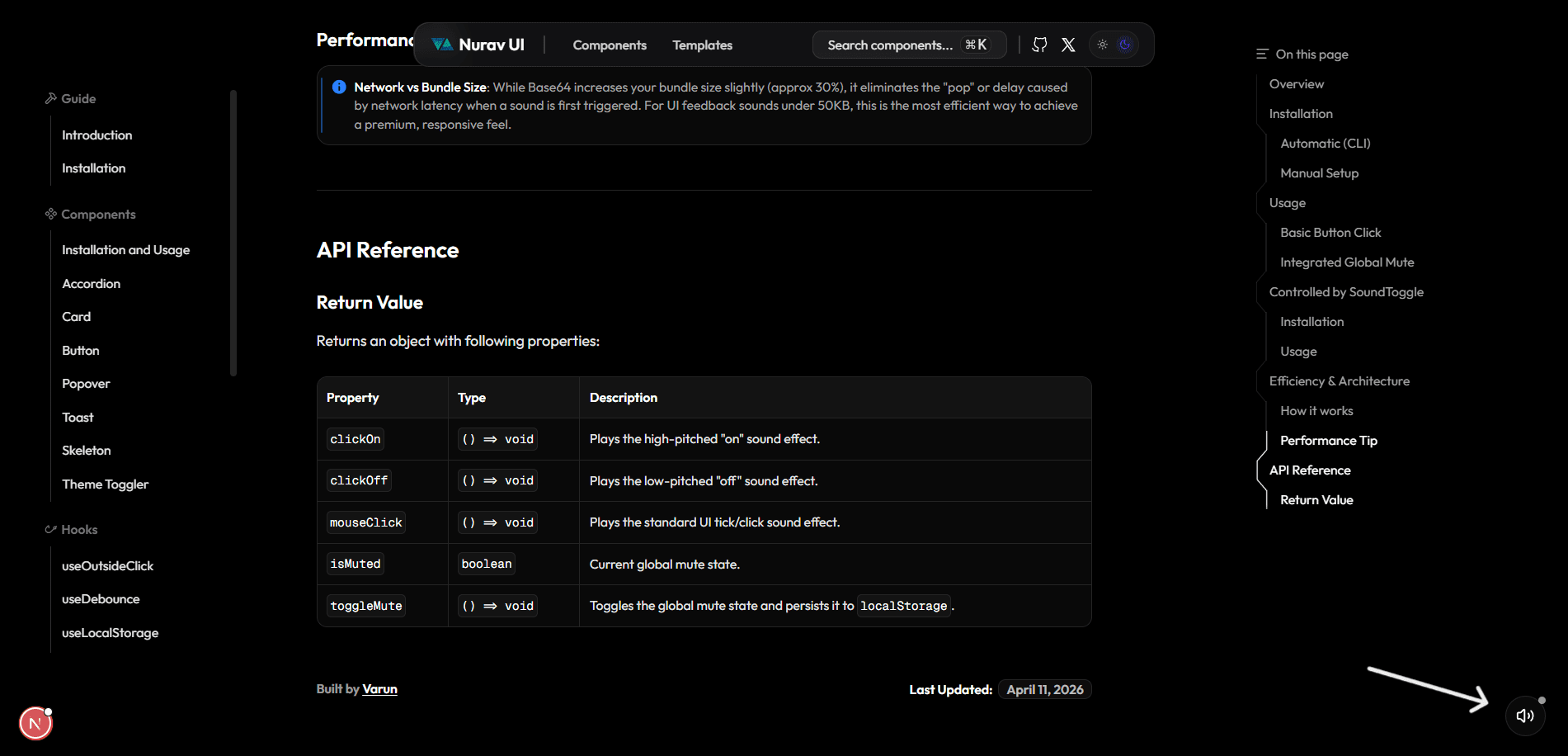
Returns an object with following properties: